
Optimizing your Google My Business (GMB) Profile is one of the most cost‑effective ways to improve your local search ranking, drive more foot traffic, and boost footfall to your brick‑and‑mortar location. In this guide, we define GMB ranking tips, highlight its benefits and key ranking factors, and walk through 15 actionable ideas from adding your business to Google Maps to leveraging hyperlocal platforms to help you dominate the Local 3‑Pack and attract more customers.
What is Google My Business Ranking?
Google My Business Ranking refers to the order in which your business appears in local search results on Google Search and Maps. To determine this ranking, Google evaluates three core criteria: relevance, distance, and prominence.
- Relevance
- Distance
- Prominence
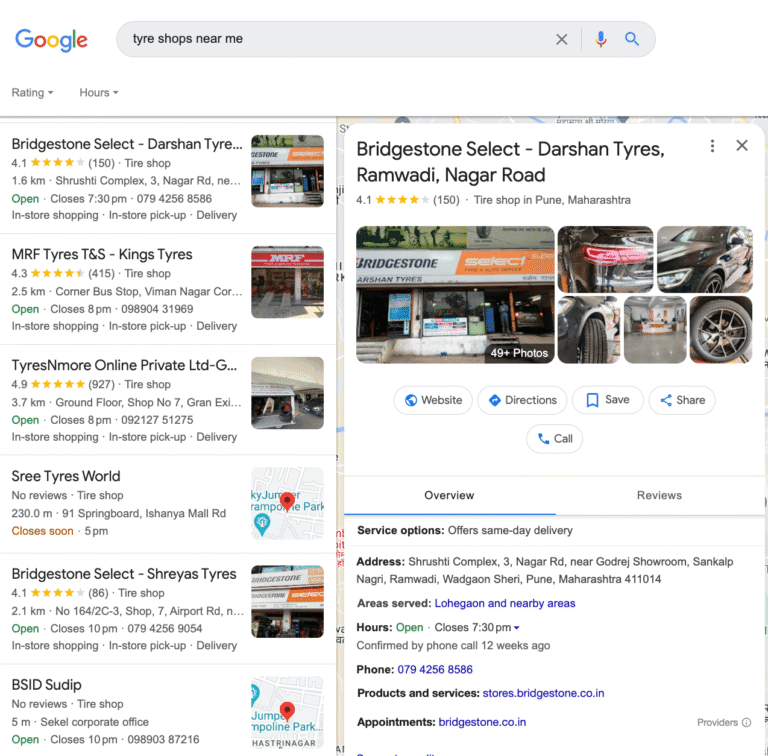
Key Benefits of Google My Business Rankings
- Increased Visibility: Appear at the top of local search results and on Google Maps, making it easier for nearby customers to find you.
- Higher Foot Traffic: Listings with complete profiles and photos see up to 42% more direction requests, directly translating into more in‑store visits.
- Improved Customer Engagement: Features like posts, Q&A, and messaging foster two‑way interaction, signaling activity and relevance to Google.
- Credibility and Trust: 91% of consumers say local branch reviews impact their perception of a brand, positive reviews and responses build social proof.
- Better Local SEO: Strong GMB rankings boost your organic presence beyond Maps, driving qualified traffic to your website.
- Competitive Advantage: Being in the Local 3‑Pack positions you ahead of other businesses, capturing clicks and calls first.
- Increased Click‑Through Rates: Top‑ranked profiles enjoy higher CTRs for website clicks and phone calls.
- Insights and Analytics: Built‑in GMB analytics help you understand how customers find and interact with your listing.
- Cost‑Effective Marketing: GMB is free; once optimised, it offers ongoing traffic without ad spend.
- Enhanced Local Authority: A well‑maintained profile indicates your relevance and authority in the community.
Important Factors that Drive the Google My Business Ranking
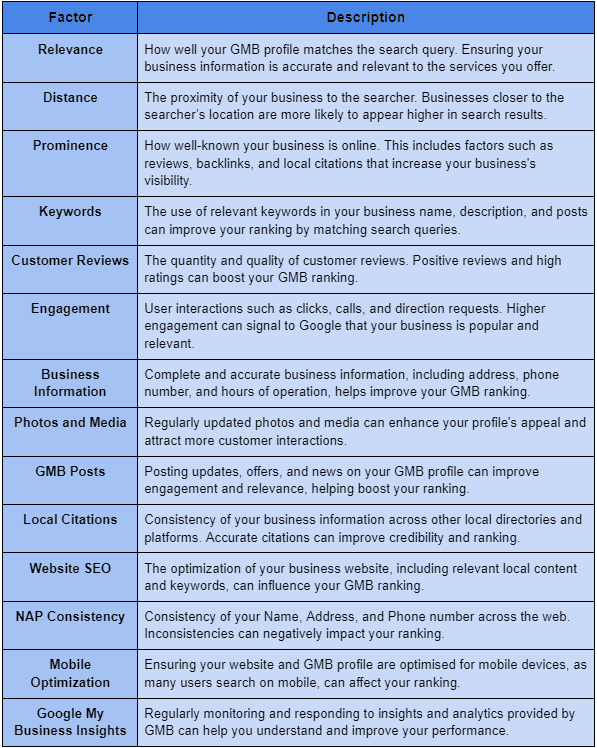
- Relevance: How closely your listing matches a search query (keywords in title, description, services).
- Distance: Proximity of your business location to the searcher’s location.
- Prominence: Overall online authority backlinks, reviews, brand mentions, and profile completeness.
- Profile Signals: Completeness of NAP (name, address, phone), business hours, categories, photos/videos, and regular posts.
Top 15 Google My Business Ranking Ideas
After complete analysis and research, we have found the top 15 GMB ranking tips that will help your business attract the right customers.
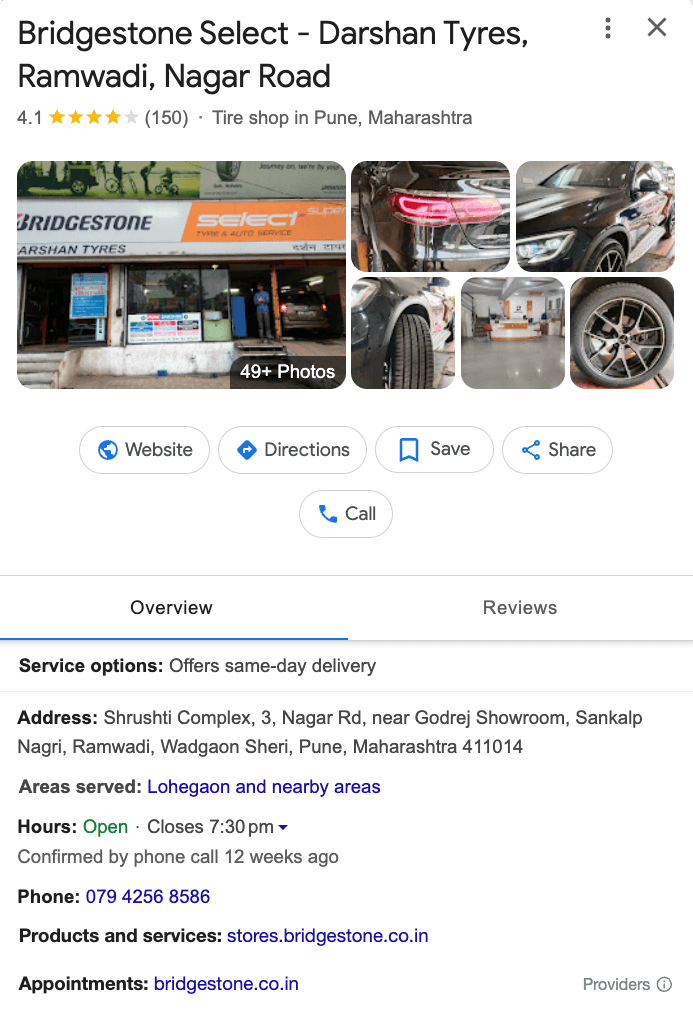
#1: Add Business on Google Maps
You need to be sure that your GMB profile is complete with accurate business category, phone number, hours, address, and website URL. Google uses these details to verify and display your listing.
KodeGurus’ Business Profile Manager helps you attract more local leads and foot traffic. We turn your GMB listing into a powerful growth tool for your business.
#2 Add Location‑Specific Keywords in Your GMB Profile
Incorporate city and neighborhood terms in your business description, services, and product names to help Google match your listing with local queries.
#3 Collect and Highlight Google Reviews
Actively solicit reviews from satisfied customers. 91% of consumers say local reviews influence their perception, and businesses that respond to reviews see 88% higher consumer trust.
#4 Use Google Posts to Promote Offers and Updates
Publish weekly or bi‑weekly Google Posts about promotions, events, and news. Posts keep your profile fresh and signal relevance to Google. One study shows that Posts boost engagement and clicks by up to 14%.
#5 Consolidate Google Maps Listings
Use the Google Business Profile dashboard to delete any duplicate listings extra entries weaken your listing’s authority and can mislead both Google and your customers.
#6 Make Use of the Q&A Feature
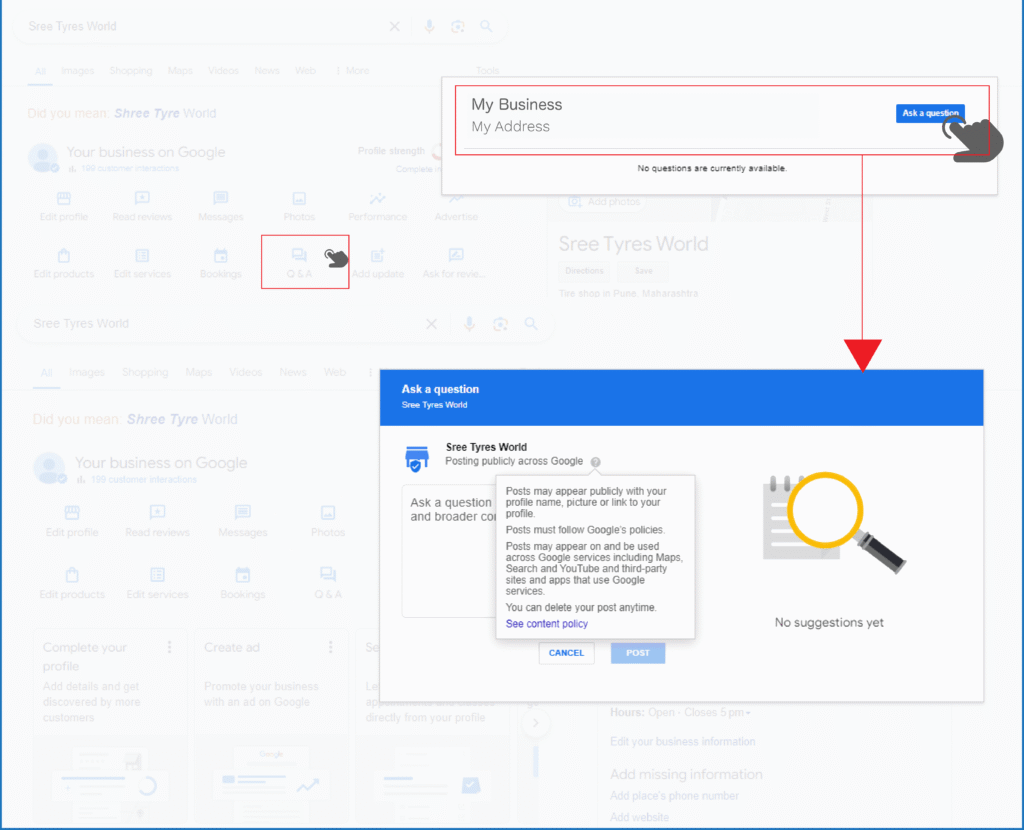
Proactively add FAQs in the Q&A section, monitor user questions, and respond promptly. Active Q&A management demonstrates customer focus and can improve rankings.
#7 Leverage GMB Listings and Microsites
Create supporting microsites or landing pages for specific locations or services. Link these microsites to your GMB profile to provide richer context and drive targeted traffic.
#8 Use GMB Audit Tools for Multi‑Location Businesses
For chains or franchises, audit each location with specialised GMB tools to identify inconsistencies, duplicates, and missing data, ensuring every listing is fully optimised.
#9 Building Quality Backlinks
Acquire local SEO backlinks from community sites, local directories, and industry partners. Backlinks remain one of Google’s top ranking factors and boost your profile’s prominence.
#10 Use Local Business Schema Markup
Implement the LocalBusiness schema on your website so search engines clearly understand your NAP details and offerings. Structured data can enhance search result display and support GMB accuracy.
#11 Keep Business Information Consistent Across the Web
Maintain uniform NAP and categories on Apple Maps, Bing Places, Yelp, and industry directories.
#12 Consider Investing in PPC
Although Google Ads and social media campaigns don’t directly influence your organic Google Business Profile rankings, they offer instant visibility and engagement, which can bolster your local footprint by driving more branded search traffic.
#13 Implement a Precision‑Powered Digital Campaign
Use privacy‑first, cookieless ad solutions (geofencing, audience segments) to reach hyper‑local customers, building brand awareness that supports organic ranking efforts.
#14 Collect and Utilise First‑Party Data
Gather insights from customer interactions (form fills, bookings, in‑store check‑ins) and use them to refine your GMB keywords, offers, and targeting.
#15 Use Hyperlocal Discovery and Omnicommerce Platforms
Leverage platforms that aggregate local signals, reviews, check‑ins, and transactional data to enrich your GMB profile and engage customers across multiple touchpoints.
Frequently Asked Questions (FAQs)
- How do I improve GMB ranking today?
Review and complete your profile, add location Local SEO 2025 keywords, post regularly, and encourage reviews to boost relevance and authority. - Can I rank #1 on Google Maps without any reviews?
Reviews are a key prominence signal, but completeness, keywords, and backlinks also play major roles. - How frequently should I update my GMB listing?
Aim for weekly posts, monthly photo uploads, and immediate updates for any business changes. - Do Google Posts help rankings?
Yes, fresh content signals activity and relevance, which Google values in local search algorithms.
Conclusion
A fully optimised Google My Business profile is foundational to any Local SEO 2025 strategy. By following these 15 GMB ranking tips from basic profile completion to advanced hyperlocal campaigns, you will enhance your local search ranking, drive more foot traffic, and ultimately boost footfall to your business. Start implementing these tactics today and watch your GMB presence propel your local growth.
Ready to take your Google My Business to the next level? Contact our team at KODEGURUS for a comprehensive GMB audit and tailored local SEO strategy. Connect with us at our toll-free number 8887104912 or email us at contact@kodegurus.com.