
Your Google My Business (GMB) profile can be a local lead-generating machine, but only if it’s set up and managed correctly. Most businesses unknowingly sabotage their GMB listings, leading to lost visibility, fewer leads, and missed opportunities.
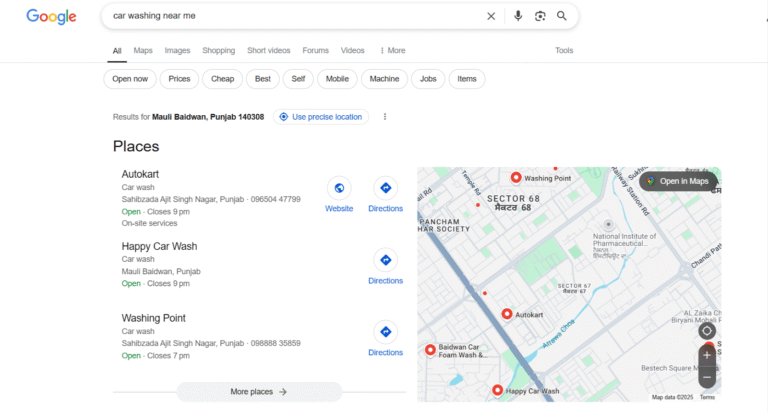
Just take a look at a simple search like “car washing near me.” The results showcase a Local Pack with businesses like Autokart, Happy Car Wash, and Washing Point listed prominently, complete with maps, contact info, and direction buttons.
These top listings aren’t random, they result from optimized GMB profiles with accurate info, verified status, active engagement, and regular updates. This snapshot shows exactly why your GMB profile matters more than ever in 2025.
At KodeGurus, we specialize in optimizing GMB profiles, auditing local SEO issues, and helping small businesses rank higher in Google Maps and search. Let’s walk through the top 10 GMB mistakes to avoid and how to fix your GMB profile to unlock consistent local leads.
Top 10 Google My Business Mistakes to Avoid
Understanding how GMB works is one thing — avoiding critical mistakes is another. Below are the 10 most common issues that reduce your visibility and hurt your local search performance, along with quick solutions to fix your GMB profile and attract more leads.
1. Incomplete or Incorrect Business Information
Your Business’s Name, Address, and Contact number (NAP) need to be 100% accurate and match exactly across all platforms. Even small inconsistencies can confuse Google and cost you rankings.
Fix: Regularly review your GMB profile to ensure all contact details, hours, and categories are accurate.
Popular Search: “Why isn’t my business showing on Google Maps?”
2. Skipping GMB Verification
Unverified listings don’t show up in search results properly. Without verification, you can’t control how your business appears.
Fix: Complete the verification process by postcard, phone, or email, depending on what Google allows.
Popular Search: “How to verify Google My Business listing”
3. Choosing the Wrong Business Category
Your primary category tells Google what your business does. Choosing something too broad or inaccurate affects your search visibility.
Fix: Be specific, for example, choose “Indian Restaurant” instead of just “Restaurant.”
4. Neglecting Customer Reviews
Reviews are a major local SEO signal. A profile with no reviews or unanswered reviews appears inactive or untrustworthy.
Popular Search: “Do reviews help local SEO?”
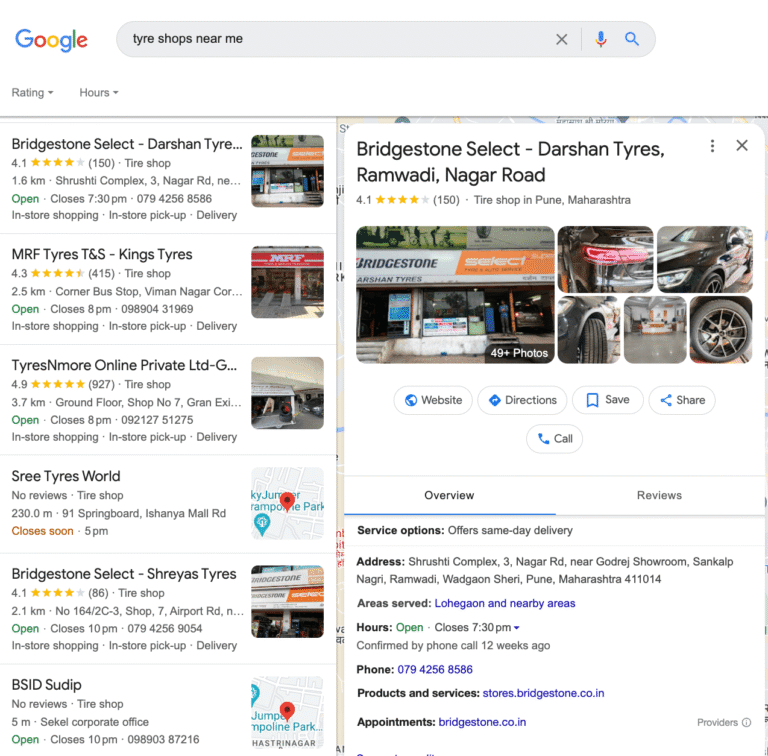
The more reviews your business receives, the more trust it builds with potential customers and with Google’s algorithm. Responding to both praise and criticism shows your commitment to service and professionalism.
Additionally, timely responses help boost engagement and improve click-through rates to your listing. Make it a habit to ask for feedback via follow-up emails, receipts, or in person after a purchase.
Encourage happy customers to leave reviews and reply to all feedback, good or bad. KodeGurus helps businesses set up automated review requests.
5. Missing High-Quality Photos
Photos make your listing stand out. Listings with quality visuals get more clicks, calls, and direction requests.
Fix: Upload clear, high-resolution photos of your storefront, products, and team. KodeGurus provides photo guidelines for GMB optimization.
6. Not Using Google Posts
Google Posts are free content snippets that let you promote events, offers, or updates. Many businesses skip this powerful tool.
Fix: Post weekly to show Google (and your customers) that your business is active.
Popular Search: “Do Google Posts affect rankings?”
7. Ignoring the Q&A Section
Leaving user-submitted questions unanswered or failing to seed common FAQs can frustrate users.
Fix: Monitor your Q&A tab and answer questions promptly. You can also add your FAQs.
8. Keyword Stuffing Your Business Name
Adding extra keywords to your business name (e.g., “Joe’s Plumbing – Best Plumber in LA”) violates Google guidelines and may get your listing suspended.
Fix: Only use your real, legal business name.
9. Inconsistent NAP Across the Web
If your business info differs on Yelp, Facebook, or directories, it confuses search engines.
Fix: Use tools or hire experts like KodeGurus to audit and fix inconsistencies across all citations.
10. Ignoring Performance Insights
Google gives free insights like how customers find you, what they click on, and what actions they take.
Fix: Monitor your GMB dashboard weekly to adapt your strategy. KodeGurus offers monthly GMB performance reports.
Why GMB Optimization Matters in 2025?
Google is the first place people go when they want local services. GMB is no longer optional, it’s foundational. A poorly managed listing can cause even great businesses to lose leads to competitors who simply show up better.
With mobile searches like “near me” at an all-time high, your business must appear prominently in the Local Pack.
Popular Search: “How do I rank higher on Google Maps?”
How KodeGurus will Help You to Fix Your GMB Profile?
At KodeGurus, we:
- Set up and verify GMB profiles
- Fix incorrect or missing information
- Add SEO-optimized business descriptions
- Post weekly updates and event promos
- Help manage and reply to reviews
- Track performance insights and optimize monthly
- Ensure citation consistency across the web
Whether you’re a local shop, service provider, or franchise, we make sure your Google My Business profile doesn’t just exist but converts.
Final Thoughts
Don’t let these avoidable GMB mistakes drain your local leads. Start with a simple audit, fix GMB profile gaps, and keep it active and relevant.
Want help optimizing your Google My Business for 2025? Contact KodeGurus today and let our team transform your local SEO game.